Reviewed · KUALA LUMPUR TOURS
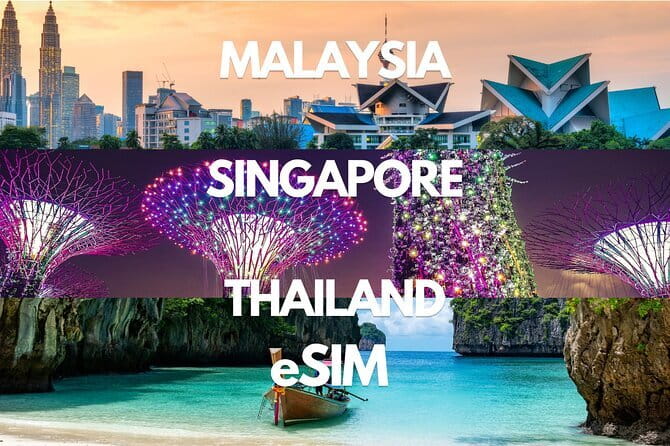
Malaysia eSIM (1 to 30 days. Up to 60GB of Data)
The useful idea here is simple: you land in Malaysia with mobile data already arranged, rather than hunting for a SIM counter at the airport. This digital eSIM works across your trip for 1 to 30 days, with 4G or 5G access and plans offering up to 60GB before speeds drop to 3G.
I like the email delivery, since you can install the plan before leaving home, and I like the flexibility for short visits or longer stays. The main catch is technical: your phone must support eSIM, and you need internet access while setting it up. The advertised duration should also be checked carefully, as the details refer to both 1 to 30 days and 3 to 30 days.
Key points to know
- Email delivery before departure: Your QR code arrives digitally, with no pickup or face-to-face meeting.
- Up to 60GB of high-speed data: After the stated allowance is used, the connection continues at 3G speed.
- 4G and 5G access: The plan is intended for mobile data at local rates during your selected period.
- Setup takes place in two stages: Install the eSIM before leaving, then activate data and roaming after you arrive.
- Remote help is included: Customer support is available if activation or use causes trouble.
- No physical SIM swapping: You avoid finding a shop, handling a tiny card, or removing your usual SIM.
What this Malaysia eSIM actually is
This is not a guided tour, transport service, or attraction ticket. It is a mobile data product for use during a visit to Malaysia, purchased from Xplori and delivered by email.
An eSIM is built into your phone rather than being a small plastic card. You receive a QR code, scan it with a compatible device, and add the Malaysia data plan to your phone. That matters most when you want to keep your home SIM in place while using Malaysian data.
The stated price is $7.90 per person, and more than 20 bookings were made in the previous month. The low price makes sense for a data-only product: you are paying for connectivity, not voice calls, airport transfer, or personal assistance on the ground.
You should treat the word data as important. The supplied details promise mobile internet access, but they do not state that a Malaysian phone number, regular calls, or text messages are included. If you normally use WhatsApp, Google Maps, email, ride apps, or video calls, this type of plan is aimed at those needs.
A few more trips around Kuala Lumpur worth a look
- Kuala Lumpur: Batu Caves Half-Day Tour with Pick-Up Option
★ 4.5 · 4,288 reviews - Private Half-Day Batu Caves and Cutural Tour in Kuala Lumpur
★ 5.0 · 3,107 reviews - Sambal Streets Kuala Lumpur Food Tour with 15+ Tastings
★ 5.0 · 2,438 reviews
The real itinerary: email, installation, arrival
Since this is a digital service, there are no sightseeing stops. Your practical journey has three parts.
First, you place the order and receive the eSIM by email. Confirmation is given at booking, so check the email address you use and keep the QR code easy to find.
Second, install the eSIM before departure. The instructions recommend setting it up on the same day as your departure date. You need an internet connection during installation, so do not wait until you are standing in an airport with no Wi-Fi and a phone that is not yet connected.
Third, after reaching Malaysia, activate the data plan and switch on data roaming. This two-stage method is worth understanding. Installing the eSIM does not necessarily mean you should start using the plan immediately. The instructions specifically tell you to activate data and enable roaming after arrival.
Print the QR code as a backup. That may sound old-fashioned, but it is sensible. If your phone cannot display the email while you are configuring the eSIM, a paper copy gives you another way to scan it. Keep the email too, since remote customer service may need the order details if something goes wrong.
The listed start point is Kuala Lumpur, while the end point is Tower 1 of the PETRONAS Twin Towers at KLCC. For this product, those locations should not be treated as meeting instructions. There is no pickup, meetup, or physical handoff. The service is digital, and you can use it during your Malaysia trip rather than traveling to KLCC to collect anything.
Device compatibility is the first decision
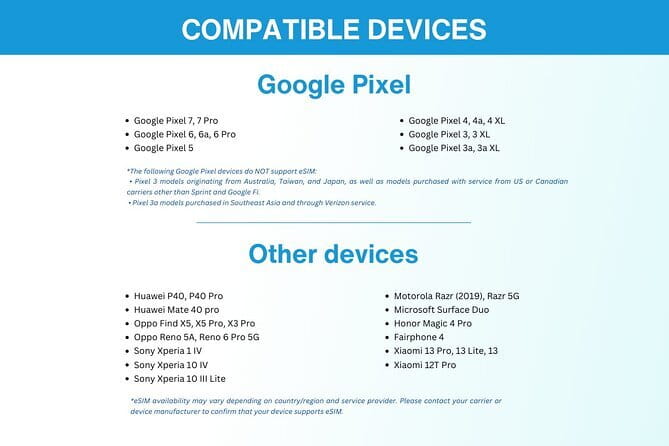
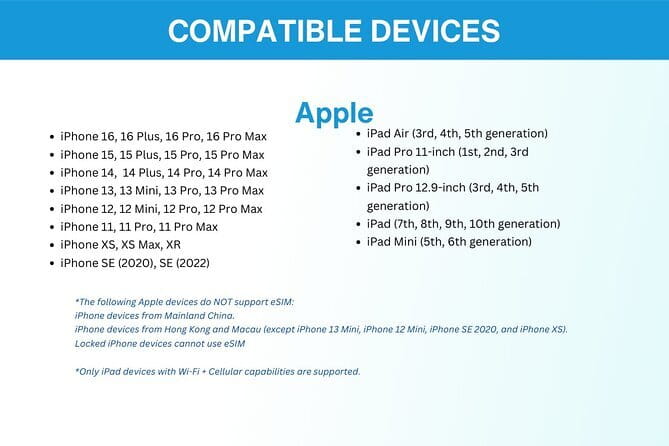
Before paying, confirm that your phone supports eSIM technology. This is the most important check in the whole purchase.
A phone that accepts only a removable SIM cannot use this product. The information provided does not give a device-by-device compatibility list, so if you are unsure, ask Xplori before booking. Do not assume that every recent phone has eSIM capability, and do not assume that an unlocked phone automatically supports it.
Your phone also needs to be able to use a foreign data plan. The supplied information tells you to check eSIM support, but it does not give detailed instructions for checking whether your handset is carrier locked. If you have any doubt about your phone, ask before buying rather than discovering the problem after landing.
I would also check that you know how to switch between your regular SIM and the Malaysia eSIM. The product is designed for convenience, but the exact menu names vary by phone. You need to be comfortable selecting the eSIM for mobile data and keeping your normal line available if you want it active.
That is the trade-off with any eSIM. It removes the hassle of a physical card, but it asks you to handle a little phone setup. For someone comfortable with phone settings, this should be minor. For someone who rarely changes mobile settings, it is worth allowing time and arranging help before departure.
What 4G, 5G, and the 3G fallback mean
The plan provides access to 4G and 5G data, depending on local network conditions and your device. The practical benefit is that you can use maps, messages, web searches, email, and other online tools without depending entirely on hotel or café Wi-Fi.
The high-speed allowance is capped at the amount attached to your chosen plan. The headline information refers to up to 60GB, but the supplied details do not specify the exact data allowance for every duration or price tier. Check the selected option before paying.
Once you use the high-speed allowance, the connection switches to 3G. Your data does not simply disappear, but it will be slower. That may still handle basic messages and simple web pages, yet it could make video calls, streaming, photo uploads, and large downloads frustrating.
This is where your habits matter. A light user who checks maps, sends messages, and looks up opening hours may find the plan quite adequate. A heavy user who streams video, uploads lots of photos, or uses a hotspot for a laptop can reach the cap faster.
The 3G fallback is a useful safety net, but I would not plan on it for demanding online work. If you need reliable high-speed service for a full trip, choose an allowance with room to spare and monitor your usage.
Same base, a different sort of day:
- Historical Malacca Guided Day Tour (Shared Tour)
★ 5.0 · 2,172 reviews - Kuala Lumpur: Sambal Street Food Tour with 15+ Tastings
★ 4.9 · 1,657 reviews - From Kuala Lumpur: Batu Caves Cultural Temple Tour
★ 4.7 · 1,453 reviews - Genting Highland & Batu Cave Guided Day Tour (SIC/Shared Tour)
★ 5.0 · 1,289 reviews
Speed and reliability in actual use

The available comments point to good performance. One person described the service as fast and reliable, while another reported 4G speeds suitable for streaming and video calls. Another account praised the connection between cities and said support handled small problems quickly.
There is also a report of strong speed in rural areas. That is encouraging, but it should not be read as a guarantee of identical service everywhere. Mobile performance depends on local coverage, the network used, buildings, terrain, congestion, and whether your handset can connect to 5G.
The most useful pattern is that the praise covers several different needs: ordinary internet use, video calls, movement between cities, and use away from major urban areas. That suggests the product is more than a basic emergency connection, at least when conditions are favorable.
One activation account was not entirely trouble-free, although the available detail is cut short. That is a reminder to set up the eSIM before leaving and not wait until you need directions at the airport. Remote support is included, but help is easier to use when you still have your home connection or hotel Wi-Fi available.
Why the $7.90 price can be good value

At $7.90 per person, this is inexpensive if you value time and convenience. You avoid finding a shop, comparing local SIM packages after a flight, waiting for activation, and handling a physical card. For a short visit, those savings can matter more than squeezing out the absolute lowest data price.
The value depends on the selected duration and data allowance. The product covers periods from 1 to 30 days, although the details also refer to plans beginning at 3 days. Check the exact option shown at checkout, especially if your visit is only a day or two.
I would compare the price with three alternatives: buying a local SIM, relying on free Wi-Fi, or using your home carrier’s roaming. A local SIM may offer a larger allowance, but it takes time and requires a compatible physical slot or a second eSIM line. Free Wi-Fi costs less, but it is less useful when you need directions while moving around. Home roaming may be easiest, but it can cost much more depending on your carrier.
The $7.90 fee also buys a measure of planning. You know before departure that a data plan is waiting in your inbox. That can be worth paying for when you arrive late, have children with you, need maps immediately, or do not want to spend your first hour in Malaysia at a phone counter.
The weak point is that the information does not spell out every plan’s exact data amount, network partner, or calling features. If those details matter to you, ask before purchase rather than judging the price from the maximum 60GB figure alone.
How to avoid the common setup mistakes

Use the following approach:
- Confirm eSIM support before booking.
- Order with an email address you can access before and during the trip.
- Install the eSIM around departure day, while you still have reliable internet.
- Keep the QR code in your email and print a copy.
- Wait until arrival in Malaysia to activate the data plan.
- Turn on data roaming for the Malaysia eSIM when you arrive.
- Check that the Malaysia line is selected for mobile data.
- Watch usage if you plan to stream or make video calls.
The instructions say internet access is required for activation. That is easy to overlook. Installing the plan at home gives you time to fix a problem, contact support, or ask someone to help with the phone settings.
You should also avoid deleting your regular SIM before the trip. The information does not tell you to remove it, and the point of an eSIM is that you can avoid swapping physical cards. Keep your original line available unless you have a specific reason to turn it off.
Who will get the most from this plan
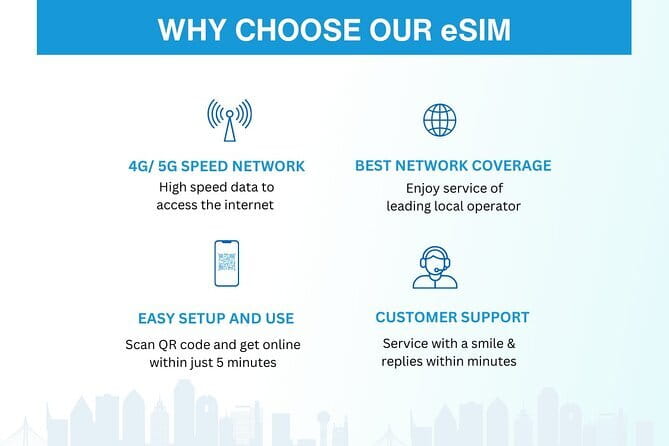
This eSIM suits a short-term visitor who wants data ready from the start and does not need a Malaysian phone number. It is also a sensible choice for someone moving between cities, since one commenter found the connection stable while traveling between locations.
It fits frequent international visitors particularly well. One person valued the ability to switch between country plans without carrying several physical SIM cards. If you travel often, the less time spent visiting phone shops adds up.
It may also suit families or small groups, although the price is per person, so each user would need a separate plan if each person wants independent data. The supplied details do not state whether one plan can be shared by hotspot, so do not assume that it can.
You may want another option if your phone does not support eSIM, if you need traditional voice calls, or if you expect to consume large amounts of video and want guaranteed high-speed data beyond the stated cap. The move to 3G after the allowance is used is the key limitation for heavy use.
Most people can participate, and no physical pickup is required. Still, participation here means using a compatible device and following the setup instructions, not joining a group activity.
Cancellation and booking details to keep in mind
Free cancellation is available when you cancel at least 24 hours before the experience start time. A cancellation inside that 24-hour window is not refunded, and changes made within the same period are not accepted.
The cut-off follows local time. Since this is a digital product, do not buy it casually and leave it unused until the last minute if you are uncertain about your phone. Check compatibility first, then select the dates and data amount that fit your trip.
Should you book this Malaysia eSIM?
I would book it if you want a quick data connection, have a confirmed eSIM-compatible phone, and value arriving prepared. The strongest reasons are the low starting price, email delivery, remote support, and the ability to avoid a physical SIM counter.
I would pause if you need a Malaysian phone number, expect heavy streaming, or cannot confirm device compatibility. Also check the exact duration and data allowance, since the supplied details describe both 1 to 30-day and 3 to 30-day options.
For a map-using, message-sending, city-to-city holiday, this is a practical purchase. Just install it before departure, carry the QR code on paper, and remember that the high-speed allowance eventually gives way to 3G.
FAQ
What is included with the Malaysia eSIM?
The purchase includes delivery of the eSIM by email, mobile data access for the selected duration, and remote customer service.
How long can I use the eSIM?
The advertised duration is 1 to 30 days. The details also refer to options from 3 to 30 days, so check the exact duration available for your chosen plan before booking.
How much data can I get?
Plans offer up to 60GB of data according to the supplied information. The exact allowance depends on the option selected.
What happens after I use the high-speed data?
After the stated high-speed allowance is used, the connection switches to 3G speed.
Does the plan provide 4G or 5G?
The eSIM provides 4G and 5G data access, subject to the conditions and equipment involved in connecting to those networks.
How do I receive the eSIM?
You receive it by email after ordering. The email contains a QR code used to install the eSIM.
When should I set up the eSIM?
You should set it up on the same day as your departure date. Internet access is required during activation, so arrange a connection before leaving.
When should I activate the data plan?
After reaching Malaysia, activate the data plan and enable data roaming.
Do I need an eSIM-compatible phone?
Yes. You should confirm that your phone supports eSIM technology before booking. You can ask the provider if you are unsure.
Is there a pickup or meeting point?
No. This is a digital product with no pickup or meetup. The Kuala Lumpur start and PETRONAS Twin Towers end details do not require you to meet there to receive the eSIM.
Can I cancel for a refund?
Yes, if you cancel at least 24 hours before the experience start time. Cancellations made less than 24 hours before the start time are not refunded.
Just added around Kuala Lumpur
- Transit Tour Private Tour (Ex Port Klang Cruise Centre/KLIA 1 &2)★ 5.0 · 10 reviews
- Sunway Lagoon Ticket (One Day Pass)★ 3.5 · 5 reviews
- Private Kuala Lumpur Shore Excursions★ 4.5 · 22 reviews
- Private Transfer: Kuala Lumpur International Airport to or from Hotel★ 4.5 · 14 reviews
- Kuala Lumpur City & Batu Caves Temple Private Tour★ 4.5 · 3 reviews
- Full Day Melaka Private Tour from Kuala Lumpur★ 4.0 · 5 reviews
- Private Port Klang Cruise to Kuala Lumpur City Tour★ 5.0 · 3 reviews
- Kuala Lumpur Airport Transit Tour (4 hours)★ 5.0 · 12 reviews
Kuala Lumpur Tours, compared.


Private Half-Day Batu Caves and Cutural Tour in Kuala Lumpur
Read our review →
Sambal Streets Kuala Lumpur Food Tour with 15+ Tastings
Read our review →
Historical Malacca Guided Day Tour (Shared Tour)
Read our review →


Genting Highland & Batu Cave Guided Day Tour (SIC/Shared Tour)
Read our review →